Part 2: Azure Beginner Mistakes, Best Practices & Roadmap
(If you found this first, remember this is Part 2. You can read Part 1: Foundations & First Steps for the basics before diving deeper.)
Quick Recap of Part 1
We covered:
- What Azure is and its advantages.
- Real-world beginner-friendly projects.
- How to sign up and use the free account.
- Key tools like Azure Portal, CLI, and Marketplace.
Now let’s go one step further — what NOT to do, what to do right, and how to grow step by step.
Common Beginner Mistakes in Azure (Expanded)
- Not Setting Budgets → Many beginners leave VMs running, leading to high bills.
- ✅ Solution: Use Cost Management + Budgets.
- ✅ Solution: Use Cost Management + Budgets.
- Wrong VM Sizes → Beginners often pick powerful (and costly) VMs for testing.
- ✅ Solution: Use B1s or free-tier VMs for practice.
- ✅ Solution: Use B1s or free-tier VMs for practice.
- Ignoring Security Basics → Using weak passwords or ignoring role-based access.
- ✅ Solution: Use Azure Active Directory (AAD) and enable MFA.
- ✅ Solution: Use Azure Active Directory (AAD) and enable MFA.
- Scattered Resources → Deploying services randomly without grouping.
- ✅ Solution: Use Resource Groups for better organization.
- ✅ Solution: Use Resource Groups for better organization.
- Forgetting Dependencies → Deleting a VM but leaving disks/networking resources behind.
- ✅ Solution: Delete the Resource Group instead of individual resources.
- ✅ Solution: Delete the Resource Group instead of individual resources.
- Skipping Monitoring → No insights into performance until something breaks.
- ✅ Solution: Enable Azure Monitor + Application Insights.
- ✅ Solution: Enable Azure Monitor + Application Insights.
Best Practices for Beginners (Expanded)
- Adopt Naming Conventions → Example: project-env-region (myapp-test-eastus).
- Enable Tags → Helps in billing and tracking projects.
- Use Auto-Shutdown → Configure labs and VMs to shut down outside work hours.
- Leverage Sandboxes → Microsoft Learn provides temporary environments free of cost.
- Balance GUI & CLI → Start in the portal, then try Azure CLI for automation.
- Learn Identity Early → Understand Azure AD, role-based access (RBAC), and permissions.
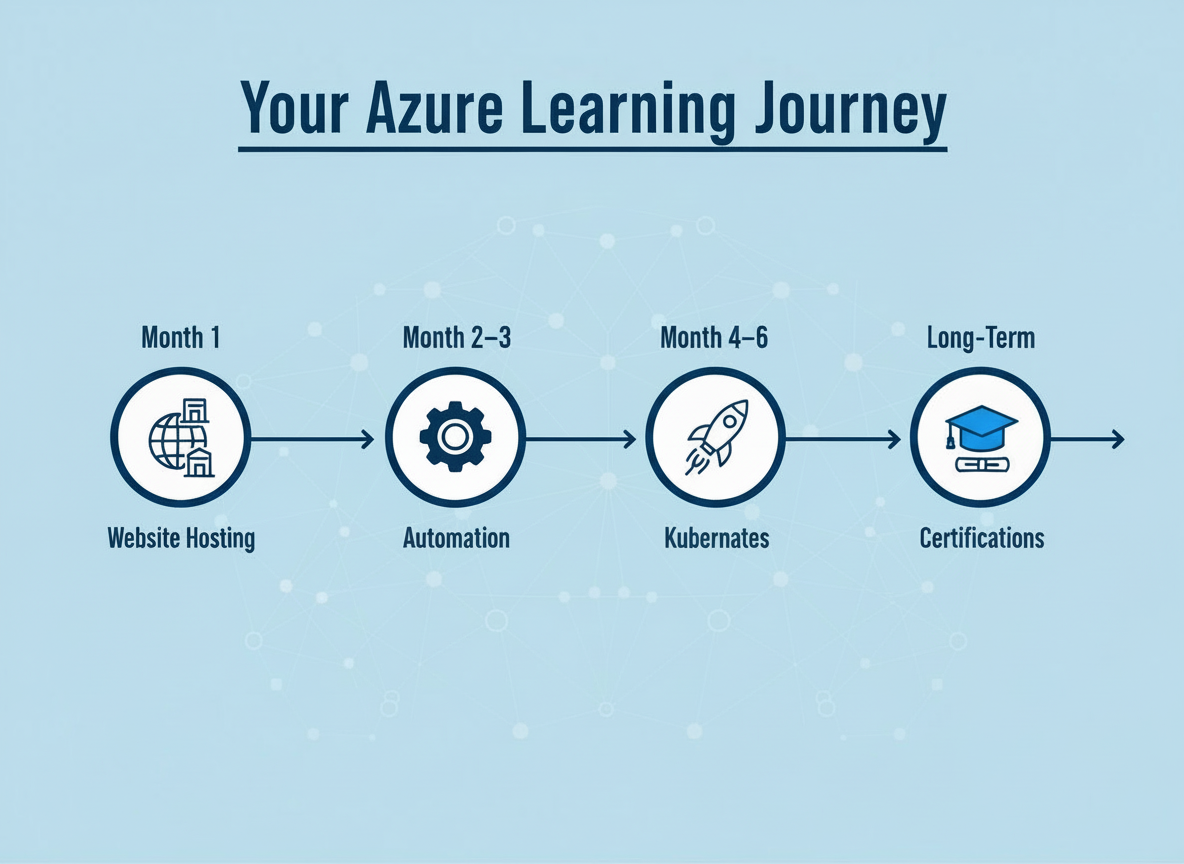
Azure Learning Roadmap (Detailed)
Here’s a 6-month roadmap for beginners:
- Weeks 1–2:
- Learn portal navigation.
- Deploy a small VM.
- Upload data to Blob Storage.
- Learn portal navigation.
- Month 1:
- Host a simple static website.
- Connect website to Azure SQL Database.
- Host a simple static website.
- Months 2–3:
- Learn Azure CLI and ARM templates.
- Automate resource deployments.
- Practice with Azure DevOps pipelines.
- Learn Azure CLI and ARM templates.
- Months 3–4:
- Experiment with serverless functions.
- Explore AI services (Vision, Language, Speech APIs).
- Experiment with serverless functions.
- Months 4–6:
- Learn Kubernetes basics with Azure Kubernetes Service (AKS).
- Deploy a containerized app.
- Integrate monitoring with Application Insights.
- Learn Kubernetes basics with Azure Kubernetes Service (AKS).
- Long-Term:
- Take certification exams (AZ-900 Fundamentals → AZ-104 Administrator).
- Apply skills to real-world projects at work or freelance.
- Take certification exams (AZ-900 Fundamentals → AZ-104 Administrator).
Beginner-Friendly Projects (Expanded)
- Portfolio Website: App Service + Blob Storage.
- Weather Forecast App: Azure Functions + external weather API.
- Q&A Chatbot: Cognitive Services + QnA Maker.
- IoT Data Dashboard: IoT Hub + Stream Analytics + Power BI.
- Online Store Prototype: App Service + SQL Database + CDN.
- Photo Gallery with AI: Blob Storage + Cognitive Services (tagging & face recognition).
Wrap-Up for Part 2
With this, you’ve got:
- A clear understanding of mistakes to avoid.
- A set of best practices to follow.
- A roadmap for the next 6 months.
- Hands-on project ideas to build confidence.
👉 If you skipped it, don’t forget to read Part 1: Azure Foundations & First Steps — together, these posts form a complete beginner’s guide to Microsoft Azure.